
Best Computer Mice (Expert Consensus)
Last reviewed: 2026-05-11
(This page is updated periodically as expert recommendations and market conditions change.)
Disclosure: This page contains affiliate links. If you buy through our links, we may earn a commission. This does not influence our recommendations or rankings.
Category Overview & Market Context
What This Category Is
A computer mouse is the primary pointing device for desktop and laptop computing. Whether you are navigating spreadsheets, editing photos, or competing in online games, the mouse you use has a direct impact on comfort, precision, and efficiency. Modern mice range from basic wireless office models to specialized ergonomic designs and ultralight gaming mice with competition-grade sensors and sub-millisecond click latency.
State of the Market
The computer mouse market in 2026 is mature and highly segmented. Logitech dominates both the productivity and gaming spaces, with its MX Master series and G Pro series representing the consensus leaders in their respective segments. Razer continues to push the competitive gaming envelope, recently launching the Viper V4 Pro and DeathAdder V4 Pro as next-generation successors to their established lines. Sensor technology has largely converged at the high end — even budget mice now offer tracking performance that would have been flagship-tier a few years ago — shifting the competitive frontier toward click technology (Logitech’s HITS haptic system, Razer’s Gen-4 optical switches), battery life, and software ecosystems. Wireless connectivity has become the default for productivity mice and is increasingly standard in gaming, with 2.4GHz dongle connections now rivaling wired performance. USB-C charging has replaced micro-USB across all current-generation models.
Who This Is For / Not For
This review is for anyone shopping for a desktop mouse, whether for office productivity, gaming, ergonomic relief, or general everyday use. It covers wired and wireless mice across a range of price points. It is not for readers seeking trackballs, trackpads, graphics tablets, presentation remotes, or gaming peripherals with non-mouse form factors (flight sticks, racing wheels). Mac-exclusive accessories like the Apple Magic Mouse are not covered; readers seeking Mac-optimized mice will find several of our winners available in Mac-specific variants.
How This Review Was Produced
This review is based on expert consensus rather than a single reviewer’s opinion.
We analyze and synthesize recommendations from multiple independent expert review sources that meet our editorial quality and transparency standards. We document where experts agree, where they differ, and why. No single source determines our recommendations.
We do not conduct original product testing. Instead, we rely on experts who do — such as publications that perform hands-on testing, lab measurements, or clearly documented evaluation methodologies.
Manufacturers do not influence our recommendations. Advertising, affiliate relationships, or commercial considerations do not affect which products are included, how they are ranked, or how they are described.
When helpful, we also consult additional secondary review outlets to understand how broader expert opinion aligns — or conflicts — with the primary consensus. These secondary sources do not determine winners but may provide context or confirmation.
Top Picks at a Glance
Best Overall
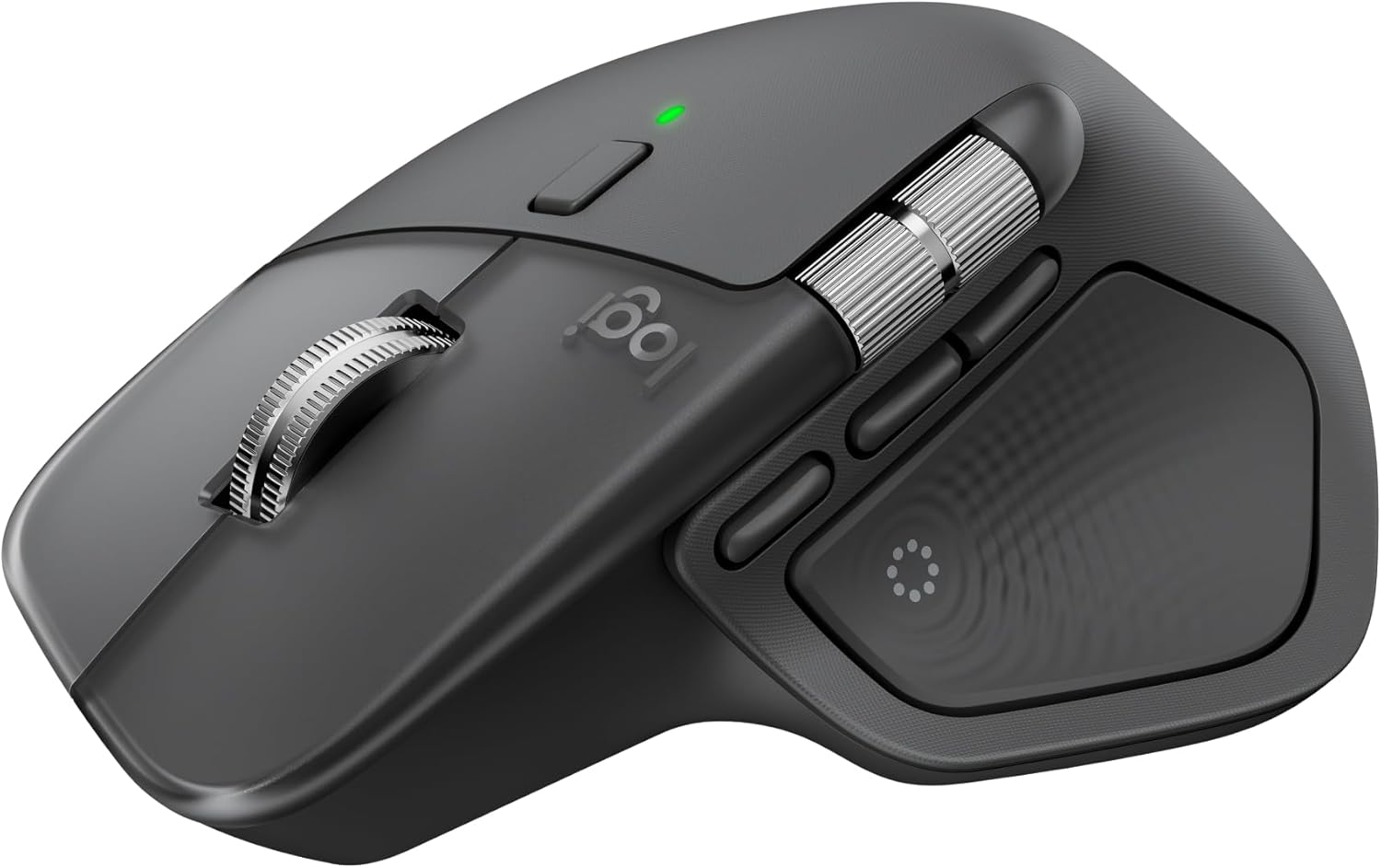
Logitech MX Master 4
The expert consensus pick for productivity, the MX Master 4 combines premium ergonomics, a dual-scroll-wheel system, haptic feedback shortcuts, and multi-device pairing in a refined design that five of seven Primary sources recommend as the top mouse for most people.
Best Gaming Mouse

Logitech G Pro X2 Superstrike
The most frequently cited top gaming mouse across expert sources, the G Pro X2 Superstrike introduces Logitech’s Haptic Inductive Trigger System for customizable click actuation and rapid trigger response, delivering bleeding-edge competitive performance in a proven lightweight chassis.
Best Ergonomic Mouse
Logitech Lift
The most consistently recommended vertical mouse across expert sources, the Lift places your hand at a 57-degree angle to reduce wrist strain, with a compact design that fits small to medium hands and is available in left-handed and Mac-specific models.
Best Budget Mouse
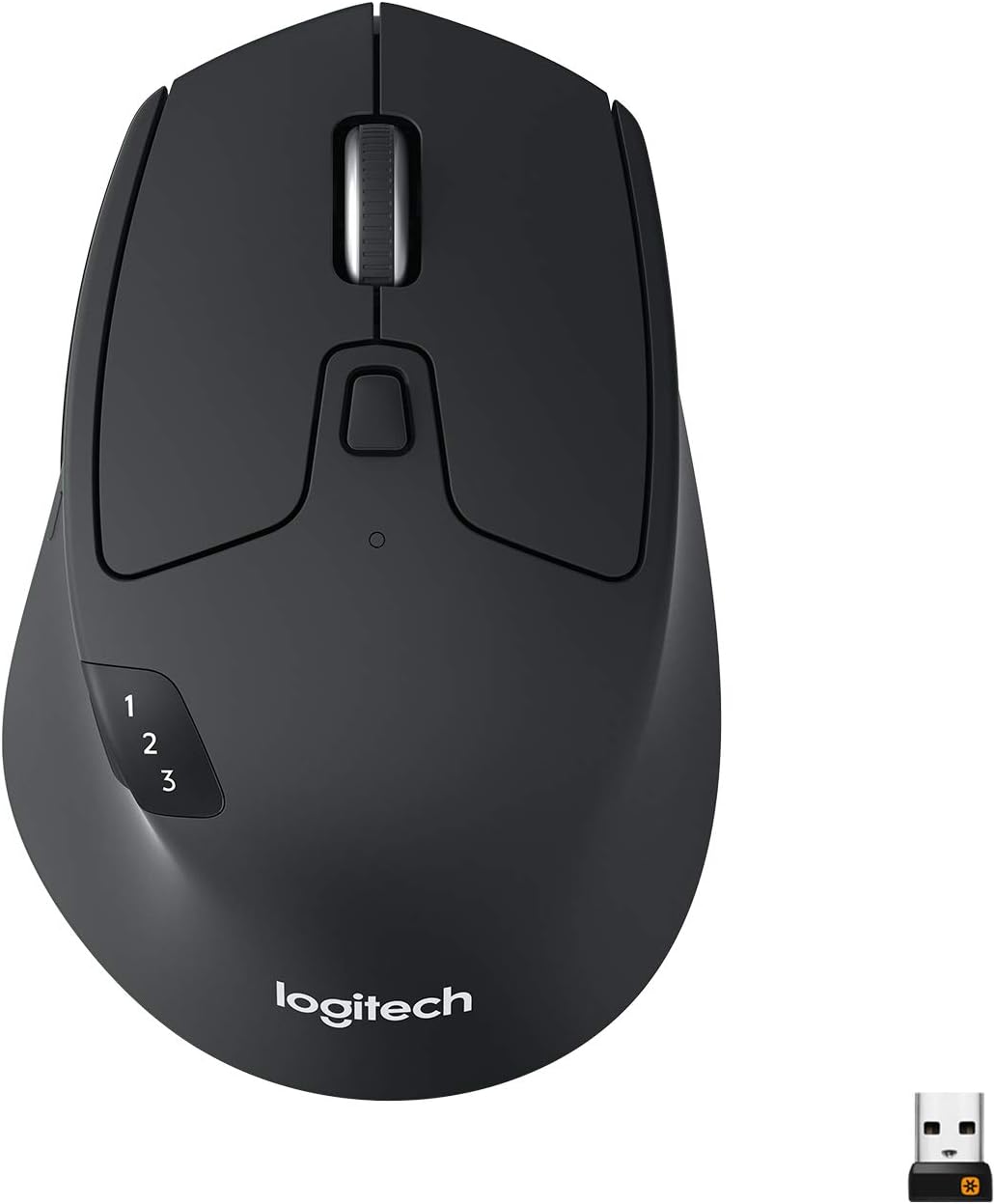
Logitech M720 Triathlon
A feature-rich wireless mouse at a budget-friendly price point, the M720 Triathlon offers multi-device Bluetooth pairing, dual-mode scrolling, and a two-year battery life — earning it Wirecutter’s Top Pick and strong recommendations from RTINGS and TechGearLab as the best value in the category.
Top Picks in Detail
Below are our recommendations explained in more depth, including why experts agree and where each pick has trade-offs.
Best Overall: Logitech MX Master 4
BEST OVERALL
Logitech MX Master 4
The expert consensus pick for productivity and everyday desktop use. Its sculpted ergonomic shape, dual-scroll-wheel system with haptic feedback, and new Actions Ring shortcuts deliver a premium workflow experience refined over multiple generations. Multi-device Bluetooth pairing and USB-C charging round out a feature set that five of seven Primary sources endorse as the top mouse for most people.
If you buy through our links, we may earn a commission. This doesn’t affect our recommendations.
Why It’s a Top Pick
The Logitech MX Master 4 is the clear consensus leader among expert sources for productivity and general-purpose desktop use. RTINGS names it Best Mouse overall, noting it keeps the premium design and ergonomic right-handed shape of the MX Master series while introducing new materials — dense silicone rubber and hard plastic replacing the older soft-touch coating that tended to wear down. PCMag selects it as Best Overall, and Tom’s Guide calls it the best mouse it can recommend right now. CNN Underscored names it its top pick after testing 18 models, praising its excellent design and quality of industrial design that shows in every click and scroll. Wirecutter recommends it as its Upgrade Pick, noting it is comfortable to use, especially for those with large hands, and has a handy thumb-scroll wheel and six other programmable buttons.
The MX Master 4 introduces several refinements over its predecessor, the MX Master 3S. Small shape tweaks make it more comfortable for a wider range of hand sizes, per RTINGS. CNN Underscored notes it is slightly taller and longer than the 3S, making it better for larger hands without ruining it for the rest of us. A new haptic button on the thumb rest opens a radial menu — the Actions Ring — filled with customizable shortcuts for apps like Photoshop, DaVinci Resolve, and Final Cut Pro. Connectivity has also been upgraded with a USB-C Logi Bolt receiver replacing the older USB-A dongle.
Note: Two Primary sources — Tom’s Hardware and TechGearLab — still recommend the Logitech MX Master 3S as their top productivity pick, as they have not yet completed testing of the MX Master 4. The MX Master 3S remains an excellent mouse and is listed as a runner-up below. Readers should be aware that source coverage is in an active model transition, and sources that have reviewed the MX Master 4 unanimously rank it above its predecessor.
What Experts Like
- Sculpted ergonomic shape fits comfortably across a wide range of hand sizes and grip styles, with improved materials that resist wear better than the 3S’s soft-touch coating
- Dual-scroll-wheel system with MagSpeed electromagnetic scrolling handles both precise line-by-line navigation and rapid 1,000-line-per-second free scrolling
- New Actions Ring and haptic thumb-rest button provide customizable shortcuts that reduce repetitive mouse movements
- Multi-device pairing with up to three devices via Bluetooth, plus a USB-C Logi Bolt receiver, with seamless switching between computers
- Battery lasts up to 70 days on a full charge with USB-C quick charging
Trade-Offs to Consider
- Right-handed only — Logitech does not make a left-handed MX Master model
- Requires Logi Options+ software running in the background to access advanced features, which could be a dealbreaker if your workplace restricts third-party apps
- 125Hz polling rate may cause cursor movement to feel slightly choppy on high-refresh-rate monitors (90Hz or higher), a trade-off RTINGS notes helps extend battery life
- The Mac version does not include a USB-C Logi Bolt receiver, though it is still compatible with one purchased separately
Runners-Up
The productivity mouse segment includes two strong alternatives that serve specific needs not addressed by the MX Master 4.
- Logitech MX Master 3S — Named Best Overall Wireless by Tom’s Hardware and Best Wireless and Best Productivity by TechGearLab, the 3S shares the MX Master series’ signature ergonomic shape and dual-scroll-wheel system at a lower price point. RTINGS recommends it as Best Upper Mid-Range. It is the predecessor to the MX Master 4, and sources that have tested both rank the newer model higher. The main drawback is a soft-touch rubberized coating that many owners report wears down quickly.
- Logitech MX Anywhere 3S — Wirecutter’s Best for Small Hands pick after panel testing with multiple testers. Its flatter, more compact shape specifically serves users whose hands are too small for the MX Master 4. It shares much of the MX Master’s feature set — including MagSpeed scrolling, multi-device pairing, and 70-day battery life — in a travel-friendly form factor. However, testers with average-size and larger hands found it uncomfortable, and it does not include a USB receiver.
Best Gaming Mouse: Logitech G Pro X2 Superstrike
BEST GAMING MOUSE
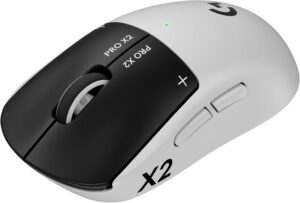
Logitech G Pro X2 Superstrike
The most frequently cited top gaming mouse across expert sources. Its Haptic Inductive Trigger System replaces traditional microswitches for customizable click actuation, rapid trigger response, and haptic feedback. Paired with the HERO 2 sensor and Lightspeed wireless at up to 8kHz polling, it delivers bleeding-edge competitive performance in a 61-gram chassis.
If you buy through our links, we may earn a commission. This doesn’t affect our recommendations.
Moderate Consensus Note: Expert sources are more divided on the best gaming mouse than on productivity mice. While the G Pro X2 Superstrike is the most frequently cited top pick, PCMag selects the Razer DeathAdder V3 HyperSpeed, Tom’s Hardware and TechGearLab lead with Razer Basilisk V3 variants, and PC Gamer names the Razer Viper V4 Pro as best overall. This reflects the gaming segment’s diversity of use cases — competitive FPS, MMO, and general gaming each favor different mouse shapes and feature sets.
Why It’s a Top Pick
The Logitech G Pro X2 Superstrike earns its position as the consensus gaming pick through the strongest cross-source support among gaming mice. RTINGS names it Best Gaming Mouse overall, calling it the best gaming mouse we’ve tested and noting it retains the widely popular and accommodating shape and high-end sensor performance of the G Pro X Superlight 2 while introducing the Haptic Inductive Trigger System (HITS). Tom’s Guide selects it as Best for Esports, noting its haptic feedback just feels cool. Among secondary sources, PC Gamer names it Best Competitive gaming mouse, and IGN awards it a 10/10 as Best Overall gaming mouse, with its reviewer blown away by how reactive the mouse felt when playing games.
The HITS technology is the Superstrike’s defining innovation. It replaces traditional microswitches with sensors that detect how far a button has been clicked, using haptic motors to simulate tactile feedback. RTINGS notes you can adjust the actuation point of your clicks and configure haptic motors under the buttons, along with a Rapid Trigger feature that dynamically adjusts the reset point for faster follow-up inputs. At 61 grams with up to 90 hours of battery life and Lightspeed wireless at up to 8kHz polling, the hardware specifications match or exceed every competitor in the market.
RTINGS does note that for most people, the Superstrike is probably overkill — the bleeding-edge performance it offers is measurable but not meaningfully noticeable in-game compared to more affordable options. This honest assessment supports the mouse’s position as the best available while acknowledging that the runners-up below represent excellent value for all but the most competitive players.
What Experts Like
- HITS technology replaces mechanical microswitches for customizable actuation points, rapid trigger reset, and adjustable haptic click feedback
- Lightweight 61-gram design uses the same widely accommodating symmetrical shape proven across the G Pro X Superlight series
- HERO 2 sensor delivers up to 44,000 DPI with 888 IPS tracking and 88G acceleration
- Lightspeed wireless supports true 8kHz polling for competition-level responsiveness
- 90 hours of battery life with USB-C charging
Trade-Offs to Consider
- The haptic click feel may not suit all preferences — RTINGS notes clicks can feel mushy even at the strongest setting, and the experience differs fundamentally from traditional mechanical switches
- UHMWPE feet included by default feel slightly muddier on most surfaces compared to PTFE feet, per RTINGS
- Requires Logitech G Hub software for full customization, including HITS tuning and Rapid Trigger configuration
- Designed primarily for competitive FPS play — readers who play mostly MMOs or strategy games may prefer the Razer Basilisk V3 or Naga V2 Pro for their additional buttons and more ergonomic shapes
Runners-Up
The gaming mouse market is deeply competitive, with multiple strong alternatives optimized for different gaming styles and preferences.
- Razer Viper V3 Pro / V4 Pro — RTINGS’ Best Upper Mid-Range Gaming pick (V3 Pro), and PC Gamer’s Best Overall (V4 Pro, updated April 2026). The Viper line offers top-of-the-line sensor performance in a low-profile symmetrical shape. The V4 Pro is the newer successor at 49 grams with 180 hours of battery life and HyperSpeed Wireless Gen-2, while the V3 Pro remains outstanding at a lower price. Note: This is an active model transition — RTINGS has tested the V3 Pro; PC Gamer has reviewed the V4 Pro. Readers should check which model is being evaluated when comparing reviews.
- Razer DeathAdder V3 HyperSpeed / V4 Pro — PCMag’s Best Gaming pick (V3 HyperSpeed) and Tom’s Guide’s Best for Gaming (V4 Pro). The DeathAdder line features a right-handed ergonomic shape that Razer has refined over multiple generations, making it one of the most comfortable gaming mice for extended sessions. Note: The V3 HyperSpeed and V4 Pro are distinct products — PCMag tested the V3 HyperSpeed, while Tom’s Guide tested the V4 Pro.
- Razer Basilisk V3 (variants) — Tom’s Hardware’s Best Gaming Mouse (V3 Pro 35K) and TechGearLab’s Best Gaming pick (V3 35K). RTINGS also recommends the wired Basilisk V3 as Best Mid-Range Mouse overall. The Basilisk V3 family offers a more ergonomic, multi-button design suited to gamers who play a wider variety of genres — not just competitive FPS — with features like a toggleable free-scroll wheel that bridges the gap between productivity and gaming mice.
Best Ergonomic Mouse: Logitech Lift
BEST ERGONOMIC MOUSE
Logitech Lift
The most consistently recommended vertical ergonomic mouse across expert sources. Its 57-degree angle places your hand in a natural handshake position to reduce wrist strain, with a compact design sized for small to medium hands, quiet clicks, and a SmartWheel for smooth scrolling. It connects via Bluetooth or Logi Bolt receiver and lasts up to two years on a single AA battery.
If you buy through our links, we may earn a commission. This doesn’t affect our recommendations.
Why It’s a Top Pick
The Logitech Lift is the standout consensus pick for readers specifically seeking an ergonomic or vertical mouse. RTINGS names it Best Vertical Mouse, noting its orientation places your hand in a more natural handshake position compared to conventional mice, aiming to reduce wrist strain. Wirecutter likewise selects it as Best for a Vertical Mouse, reporting that panel testers of various hand sizes found it held their wrists at a more neutral angle than other vertical picks. CNN Underscored names it Best Vertical Ergonomic Mouse. TechGearLab selects it as Best Ergonomic Wireless Mouse. Tom’s Hardware also recommends it as Best Vertical in its wireless roundup.
Readers should note that the Logitech MX Master 4 — our Best Overall winner — is also named Best Ergonomic Mouse by both RTINGS and CNN Underscored, reflecting its sculpted shape and natural tilt angle. We selected the Lift for this segment because it represents a distinct ergonomic approach (true vertical orientation) that serves readers whose wrist discomfort is not resolved by a conventionally shaped mouse, no matter how well designed. The MX Master 4’s ergonomic merits are thoroughly covered in the Best Overall segment above.
The Lift is available in right-handed and left-handed models, as well as a Mac-specific version — a range of options that Wirecutter and RTINGS both highlight. Vertical mice do have a learning curve, and Wirecutter cautions that they are not a magical cure-all for hand and wrist pain. However, for readers who have tried conventional mice and continue to experience discomfort, the Lift is the most accessible and well-reviewed entry point into vertical mousing.
What Experts Like
- 57-degree vertical angle promotes a natural handshake wrist position, reducing forearm strain during extended use
- Compact size specifically designed for small to medium hands, filling a gap left by larger vertical mice like the Logitech MX Vertical
- Quiet SilentTouch clicks and SmartWheel scrolling with dual-mode precision and free-scroll switching
- Available in right-handed, left-handed, and Mac-specific variants — more accessibility options than any competing vertical mouse
- Two-year battery life on a single AA battery with Bluetooth and Logi Bolt USB connectivity
Trade-Offs to Consider
- Vertical form factor has a learning curve that may take several days of adjustment, especially for longtime conventional-mouse users
- Not suitable for gaming — the vertical shape does not support the quick lateral movements required for competitive play
- Designed specifically for small to medium hands; users with larger hands should consider the Logitech MX Vertical instead
- Fewer programmable buttons (four) compared to conventional productivity mice like the MX Master 4
Runners-Up
- Razer Pro Click V2 Vertical — RTINGS’ Best Ergonomic Gaming pick. The Pro Click V2 Vertical is the only vertical mouse identified in our research that bridges ergonomic design with gaming-grade sensor performance (Focus Pro 30K sensor). It fills a niche for gamers who need ergonomic wrist support but do not want to sacrifice precision. However, it has only a single Primary source endorsement, and at 71.7 degrees it uses a steeper angle than the Lift’s 57 degrees, which may require more adjustment time.
Best Budget Mouse: Logitech M720 Triathlon
BEST BUDGET MOUSE

Logitech M720 Triathlon
Delivers an impressive feature set at a budget-friendly price point. Multi-device Bluetooth pairing across three devices, dual-mode scrolling with free-spin capability, a gesture button, and a two-year battery life on a single AA make it the best value mouse identified across expert sources. Wirecutter has named it their Top Pick since 2016.
If you buy through our links, we may earn a commission. This doesn’t affect our recommendations.
Moderate Consensus Note: Three Primary sources recommend the M720 Triathlon as the top budget or value pick. Tom’s Guide selects the Logitech Signature M650 instead, which is listed as a runner-up below.
Why It’s a Top Pick
The Logitech M720 Triathlon is the consensus budget pick, recommended by three Primary sources as the best value mouse available. Wirecutter has named it their Top Pick for wireless mice since 2016, calling it the most comfortable option for a variety of hand sizes and grip styles. RTINGS selects it as Best Budget Mouse, noting that while more premium options in Logitech’s MX series get lots of attention, the M720 quietly offers many of the same features at a more affordable price point. TechGearLab recommends it as Best Value Wireless, praising its premium features at a great, wallet-friendly price.
What distinguishes the M720 Triathlon from cheaper alternatives is its feature depth. It supports multi-device pairing with up to three computers via Bluetooth or its USB Unifying receiver, with Logitech’s Easy-Switch technology for seamless toggling. The scroll wheel toggles between a controlled notched mode and a fast free-scrolling mode, and it supports left and right tilt inputs for horizontal scrolling in spreadsheets. An integrated gesture button hidden in the thumb rest adds further customization. Wirecutter notes that Logitech claims its single AA battery will last for two years, and Wirecutter’s own testing has confirmed that estimate.
What Experts Like
- Multi-device pairing with up to three computers via Bluetooth or USB Unifying receiver, with one-touch Easy-Switch toggling
- Dual-mode scroll wheel toggles between notched precision and free-spin speed scrolling, plus left-right tilt for horizontal navigation
- Full-size ergonomic right-handed shape comfortable for most hand sizes, with six programmable buttons including a hidden thumb gesture button
- Two-year battery life on a single AA battery eliminates recharging interruptions
- Compatible with Logi Options+ for button customization and Logitech Flow for cross-computer cursor and file transfer
Trade-Offs to Consider
- Right-handed only — no left-handed or ambidextrous variant available
- Does not feel as premium as the MX Master series and lacks a second thumb scroll wheel
- 1,000 DPI sensor is adequate for productivity but not gaming
- Uses a USB-A Unifying receiver rather than the newer USB-C Logi Bolt standard
Runners-Up
- Logitech Signature M650 — Tom’s Guide’s Best Budget pick. At a lower price point than the M720, the M650 offers SilentTouch quiet clicks, SmartWheel dual-mode scrolling, and a choice of sizes (small-to-medium and large) plus a left-handed model. It trades the M720’s multi-device pairing and gesture button for a simpler, more compact design at an even more accessible price.
- Logitech G305 Lightspeed — RTINGS’ Best Budget Gaming Wireless pick, also recommended by CNET as a budget gaming value. The G305 bridges the budget and gaming segments for readers who want affordable gaming-capable performance. Its Lightspeed wireless delivers 1ms response time competitive with wired mice, and it weighs just 99 grams. The trade-off is a basic design with AA battery power rather than USB-C rechargeable, and a gaming-focused feature set with fewer productivity features than the M720 or M650.
How to Choose the Right Computer Mouse for You
Decide whether you need a productivity mouse, a gaming mouse, or an ergonomic mouse. These three categories use fundamentally different designs. Productivity mice prioritize comfort, multi-device connectivity, and workflow features like programmable buttons and scroll-wheel customization. Gaming mice prioritize low click latency, lightweight construction, and high-precision sensors optimized for fast-paced gameplay. Ergonomic mice prioritize wrist angle and hand posture to reduce strain during extended use. Some mice bridge categories — the Razer Basilisk V3 family, for example, combines productivity scroll features with gaming-grade sensors — but most users are best served by choosing within one of these three lanes.
Consider your hand size and grip style. Mouse comfort depends heavily on the fit between a mouse’s shape and your hand. Experts identify three common grip styles: palm grip (hand rests fully on the mouse), claw grip (palm rests on the back with arched fingers), and fingertip grip (only fingertips touch the mouse). Larger mice like the MX Master 4 are best for palm grip users with medium to large hands. Compact mice like the MX Anywhere 3S serve users with small hands or those who prefer fingertip control. Gaming mice are increasingly designed for claw and fingertip grips, where lighter weight and lower profiles allow faster directional changes.
Wireless is the default for most users in 2026, but connection type still matters. Modern 2.4GHz wireless dongles deliver latency indistinguishable from wired connections — a one-millisecond report rate is now standard across even budget gaming mice like the Logitech G305 Lightspeed. Bluetooth offers the convenience of no dongle and multi-device pairing, but may introduce slightly higher latency. For competitive gaming at the highest levels, 2.4GHz wireless with 4kHz or 8kHz polling provides the lowest possible latency. Wired mice have become a niche choice, primarily for users who want the lightest possible weight (no battery) or prefer the security of a physical connection.
Multi-device pairing is a major productivity feature. If you use more than one computer — a common scenario for remote and hybrid workers — mice with multi-device Bluetooth pairing and Easy-Switch toggling let you control multiple machines from a single mouse. Logitech’s Flow technology, available on the MX Master 4, M720 Triathlon, and other Logi Options+ compatible mice, goes further by allowing you to move your cursor between computers and even copy-paste files across them. This feature is not available on gaming mice or most budget models.
Sensor performance has largely converged, but dots per inch (DPI) and polling rate still matter for specific use cases. Modern sensors in even mid-range mice track accurately on nearly any surface, including glass. For productivity use, DPI above 1,000 is more than sufficient. For competitive gaming, higher DPI (12,000+) and higher polling rates (1,000Hz minimum, with 4kHz and 8kHz now available on flagship mice) provide measurably smoother cursor movement on high-refresh-rate monitors. However, most users will not perceive a difference beyond 1,000Hz polling in everyday use.
Software ecosystems affect the day-to-day experience. Most modern mice rely on companion software for button customization, DPI profiles, and advanced features. Logitech uses Logi Options+ for productivity mice and G Hub for gaming mice. Razer uses Synapse 4 (now also available as a browser-based tool with the V4 Pro). These apps run in the background, which may be a consideration on resource-constrained machines or in workplaces that restrict third-party software installations. Consider whether you want all your peripherals on the same software ecosystem to minimize background processes.
Platform compatibility varies by model. Most mice in this review work across Windows, macOS, ChromeOS, and Linux for basic functions. However, advanced features like button customization and Flow cross-computer control typically require Logi Options+ or Razer Synapse, which may have limited functionality or availability on non-Windows and non-macOS platforms. Logitech sells Mac-specific variants of the MX Master 4, MX Anywhere 3S, and Lift that come in Apple-matching color options — functionally identical to the standard models but without a USB receiver in some cases. iPadOS compatibility is available on several Logitech models via Bluetooth.
Weight is critical for gaming, less so for productivity. Competitive gaming mice have trended steadily lighter, with flagship models now below 50 grams. The Razer Viper V4 Pro weighs 49 grams; the Logitech G Pro X2 Superstrike weighs 61 grams. For fast-paced games like first-person shooters, lighter weight translates to faster flick movements and less fatigue during long sessions. For productivity use, weight is rarely a deciding factor — ergonomic shape and comfort matter more.
How We Make Our Recommendations
Our recommendations follow a documented, repeatable editorial process designed to prioritize expert agreement, comparability, and clarity.
For each category, we:
- Define clear category scope and exclusions
- Identify and vet independent expert review sources
- Inventory all products reviewed across those sources
- Analyze patterns of agreement and disagreement
- Apply editorial judgment only after consensus is documented
When a category includes materially different product types, we segment recommendations rather than forcing a single “best overall.” For more information, see How We Work.
Sources & Citations
Primary Sources
- CNN Underscored, We tested 18 models to find the best computer mouse. Here’s our clear winner, Jan. 2026
- CNN Underscored, We found the two best ergonomic mice to keep you comfortable, Jan. 2026
- PCMag, The Best Computer Mice for 2026, April 2026
- RTINGS, The Best Cheap And Budget Gaming Mouse of 2026, April 2026
- RTINGS, The Best Ergonomic Mouse of 2026, April 2026
- RTINGS, The Best Gaming Mouse of 2026, March 2026
- RTINGS, The Best Lightweight Mouse of 2026, Feb. 2026
- RTINGS, The Best MMO Mouse of 2026, May 2026
- RTINGS, The Best Mouse of 2026, March 2026
- RTINGS, The Best Wireless Gaming Mouse of 2026, March 2026
- RTINGS, The Best Wireless Mouse of 2026, March 2026
- TechGearLab, The Best Mouse, Aug. 2025
- TechGearLab, The Best Wired Mouse, Aug. 2025
- TechGearLab, The Best Wireless Mouse, Aug. 2025
- Tom’s Guide, The best mouse in 2026 for work, gaming and beyond, March 2026
- Tom’s Guide, The best wireless mouse in 2026 — tested and reviewed, March 2026
- Tom’s Hardware, Best Gaming Mouse 2026: Our Tested Picks for Every Gamer and Grip Style, Jan. 2026
- Tom’s Hardware, Best Wireless Mouse 2026: Our Tested Picks for Productivity, Portability, and Comfort, Jan. 2026
- Wirecutter, The Best Wireless Mouse, Feb. 2026
Secondary Sources Consulted for Context
- CNET, Best Wireless Mouse for 2026, Aug. 2024
- Engadget, The best wireless mice for 2026, Nov. 2025
- IGN, Best Gaming Mouse in 2026: Wired and Wireless Mice, March 2026
- PC Gamer, Best gaming mouse in 2026: We’ve tested the very best mice and these are the top picks, April 2026
- Reviewed, The Best Wireless Mouse of 2026, April 2024
- TechRadar, The best mouse in 2025: a mouse expert’s top picks for gaming, wrist pain, and more, Dec. 2025
- Windows Central, Best mouse in 2026: The best mice for gaming, ergonomics, and more, March 2026
- WIRED, The Best Gaming Mouse, Dec. 2025
Additional Sources Reviewed
- Consumer Reports, The Best Ergonomic Mouse for You, July 2020 [subscription required]
- The Strategist, The Best Gaming Mice, According to Gamers, April 2026
Updates & Ongoing Review
This review is monitored on an ongoing basis. We update recommendations when expert sources publish new test results, products are discontinued, or consensus meaningfully changes.
Version History
- 2026-05-11 — Initial publication