
Best Label Makers (Expert Consensus)
Last reviewed: 2026-03-28
(This page is updated periodically as expert recommendations and market conditions change.)
Disclosure: This page contains affiliate links. If you buy through our links, we may earn a commission. This does not influence our recommendations or rankings.
Category Overview & Market Context
What This Category Is
A label maker is a handheld or compact desktop device that prints adhesive-backed labels on demand. These devices range from simple keyboard-operated units that produce laminated tape labels to Bluetooth-connected models that pair with a smartphone app for expanded fonts, templates, and design options. Consumer label makers are designed for home organization, office filing, pantry labeling, craft projects, and similar everyday tasks.
This review covers consumer handheld and compact label makers intended for home and office use. It does not cover industrial label printers, desktop shipping label printers, vinyl cutting machines, or embossing-only manual devices, as these serve materially different purposes and are evaluated by experts using different criteria.
State of the Market
The consumer label maker market is dominated by two major brands: Brother and DYMO, with Epson emerging as a strong contender in the Bluetooth-connected segment. Brother’s P-touch line commands the broadest expert support across nearly every major review source, spanning budget keyboard models through advanced Bluetooth units. DYMO remains a familiar household name but has received increasingly mixed reviews from expert testers in recent years, with some sources flagging quality-control concerns. Epson’s LabelWorks line has drawn attention for its superior print resolution and tape variety, though its models require a smartphone for all operation.
A key shift in the category is the growing popularity of hybrid label makers that offer both a built-in keyboard and Bluetooth app connectivity. These models let users choose their preferred input method — typing directly on the device for quick labels or using a smartphone for more creative designs — without committing to one approach.
Who This Is For / Not For
This review is for anyone looking to add clean, consistent, professional-looking labels to their home, office, or personal projects. That includes home organizers tackling pantry shelves and storage bins, small-business owners printing asset tags or product labels, parents labeling school supplies, and hobbyists who enjoy the satisfaction of a well-labeled space.
This review is not for professionals who need industrial-grade label printers for electrical wiring, warehouse inventory, or high-volume shipping. Those use cases require specialized equipment with different evaluation criteria.
How This Review Was Produced
This review is based on expert consensus rather than a single reviewer’s opinion.
We analyze and synthesize recommendations from multiple independent expert review sources that meet our editorial quality and transparency standards. We document where experts agree, where they differ, and why. No single source determines our recommendations.
We do not conduct original product testing. Instead, we rely on experts who do — such as publications that perform hands-on testing, lab measurements, or clearly documented evaluation methodologies.
Manufacturers do not influence our recommendations. Advertising, affiliate relationships, or commercial considerations do not affect which products are included, how they are ranked, or how they are described.
When helpful, we also consult additional secondary review outlets to understand how broader expert opinion aligns — or conflicts — with the primary consensus. These secondary sources do not determine winners but may provide context or confirmation.
Top Picks at a Glance
Best Overall
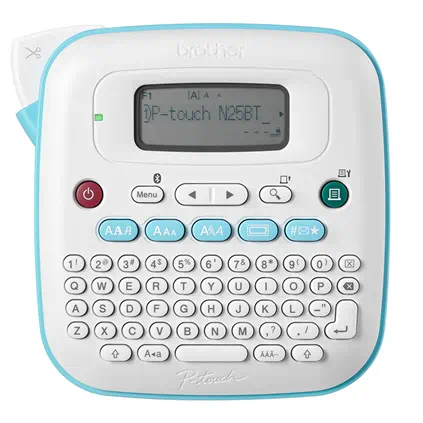
Brother P-touch PT-N25BT Personal Connected Label Maker
This hybrid keyboard-and-Bluetooth label maker earned top marks from three of our seven Primary sources for its ease of use, sharp print quality, and the most affordable tape ecosystem we found.
Top Picks in Detail
Below are our recommendations explained in more depth, including why experts agree and where each pick has trade-offs.
Best Overall: Brother P-touch PT-N25BT Personal Connected Label Maker
BEST OVERALL
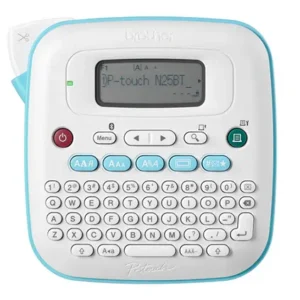
Brother P-touch PT-N25BT Personal Connected Label Maker
Combines a comfortable QWERTY keyboard with Bluetooth app connectivity, giving you the flexibility to type labels directly or design them on your phone. Expert testers consistently praised its sharp print quality, durable labels, and the affordability of its Btag tape refills.
If you buy through our links, we may earn a commission. This doesn’t affect our recommendations.
Why It’s a Top Pick
The Brother PT-N25BT emerged as the strongest consensus pick across our Primary sources. Wirecutter named it their Top Pick after testing 19 devices over 25 hours, noting that labels were consistently sharp, high quality, and durable enough to survive multiple dishwasher cycles. CNN Underscored selected it as Best Budget after hands-on testing of seven models from Brother, Epson, and DYMO, praising its intuitive keyboard layout and instantly learnable interface. Business Insider chose it as Best Budget Bluetooth after testing 13 label makers, highlighting the dual-input flexibility that lets users choose between the physical keyboard and the Brother Design&Print 2 smartphone app.
What sets the PT-N25BT apart is its ability to serve both traditional label-maker users and those who prefer app-driven design — all at a price point that undercuts most competitors. Its Btag tape refills run roughly half the cost of comparable tapes from other brands, which keeps the long-term cost of ownership low.
What Experts Like
- Dual input options let you type directly on the QWERTY keyboard or design labels via the Brother Design&Print 2 smartphone app
- Btag tape refills are among the most affordable in the category, with more than a dozen color options
- Sharp, high-quality print output that holds up through water exposure and dishwasher cycles
- Compact and lightweight design that is comfortable to hold and use on a desk
Trade-Offs to Consider
- No rechargeable battery — requires six AAA batteries or an AC adapter, both sold separately
- No automatic cutter; you must manually actuate the built-in cutter or use scissors for batch labels
- Non-backlit display can be difficult to read in low-light conditions
- Limited to 12mm tape width, which restricts label size compared to premium models
Runners-Up
While the PT-N25BT offers the broadest appeal, several other label makers earned strong expert support for users with different priorities.
- Brother P-touch Cube Plus (PT-P710BT) — Business Insider’s Best Overall and TechGearLab’s Best Bluetooth pick. This app-only label maker offers a rechargeable battery, automatic cutter, 24mm tape width, and access to a vast library of fonts and templates through the Brother smartphone apps. It delivers the most customization options of any model tested but requires a smartphone for all operation, which some users find limiting. Consumer Reports called it the Most Dependable label maker they tested.
- Brother PT-D220 — The Spruce’s Best Overall after six months of hands-on testing. A traditional keyboard-only label maker with 14 fonts, 99 frames, and more than 600 symbols. It uses Brother’s water-resistant TZe laminated tape and is a reliable workhorse for users who want no-app simplicity. It lacks Bluetooth connectivity entirely, which limits customization compared to the PT-N25BT.
- Epson LabelWorks LW-C610PX — CNN Underscored’s Best Overall after testing seven models. This Bluetooth-only label maker stands out for its 360 dots-per-inch (dpi) print resolution — the sharpest in the category — and access to more than 170 tape varieties through Epson’s LabelWorks line. It also features an automatic cutter and a lifetime warranty from Epson. However, it has no keyboard and requires a smartphone for all label creation, and it runs on six AA batteries with no rechargeable option.
How to Choose the Right Label Maker for You
Decide how you want to create labels: keyboard, app, or both. Label makers fall into three input categories. Keyboard models let you type and print labels directly on the device with no phone required. Bluetooth models connect to a smartphone app for design and printing, which offers more fonts, templates, and creative tools but requires your phone nearby. Hybrid models like our Best Overall pick offer both options, giving you flexibility to choose based on the task at hand. Professional organizer Mindy Godding, president of the National Association of Productivity and Organizing Professionals, noted in Business Insider that those who are intimidated by technology can find app settings confusing to navigate, making a keyboard model or hybrid a safer choice for less tech-savvy users.
Consider ongoing tape costs, not just the label maker’s purchase price. Replacement tape is a recurring expense that varies significantly by brand and model. Some brands charge more than twice as much per roll as others for comparable lengths. Before buying, check the cost and availability of compatible tape cartridges, and consider whether you need specialty tapes such as clear, colored, or decorative finishes. Models that minimize tape waste through tighter margins or automatic cutting can also reduce long-term costs.
Think about label width and how much text you need to fit. Most consumer label makers print on tape up to 12mm (roughly half an inch) wide, which is sufficient for simple one- or two-line labels. If you need larger, more readable labels — for example, for pantry bins, binder spines, or retail displays — look for models that support 24mm (one-inch) tape. Wider tape generally means a larger, heavier device and higher tape costs.
Evaluate power options for your intended use. Label makers are powered by disposable batteries, rechargeable batteries, or AC adapters — and many do not include any power source in the box. If portability matters, a rechargeable battery eliminates the hassle of keeping disposable batteries on hand. If the label maker will live on a desk, an AC adapter provides consistent power. Check what comes in the box before purchasing, as buying batteries or an adapter separately adds to the initial cost.
Match the label maker to your typical use case. For occasional home labeling — pantry jars, file folders, storage bins — a simple keyboard model is usually sufficient and the most affordable option. For creative projects, crafting, or producing labels with custom fonts and graphics, a Bluetooth model with a robust app offers more design flexibility. For small-business needs like barcode printing, asset tags, or address labels, look for models with USB computer connectivity and business-oriented templates. If you are outfitting a home office, a label maker pairs naturally with a dependable printer for everything beyond labels.
How We Make Our Recommendations
Our recommendations follow a documented, repeatable editorial process designed to prioritize expert agreement, comparability, and clarity.
For each category, we:
- Define clear category scope and exclusions
- Identify and vet independent expert review sources
- Inventory all products reviewed across those sources
- Analyze patterns of agreement and disagreement
- Apply editorial judgment only after consensus is documented
When a category includes materially different product types, we segment recommendations rather than forcing a single “best overall.” For more information, see How We Work.
Sources & Citations
Primary Sources
- Business Insider, Best label makers (2026), Jan. 2026
- CNN Underscored, The best label makers in 2026, tried and tested, Jan. 2026
- Consumer Reports, Best Label Makers, July 2022 [subscription required]
- Reviewed, The Best Label Makers of 2026, Dec. 2024
- TechGearLab, The Best Label Maker of 2023, Dec. 2024
- The Spruce, The 5 Best Label Makers The Spruce Has Tested, Jan. 2026
- Wirecutter, The Best Label Makers, Dec. 2025
Secondary Sources Consulted for Context
- Bob Vila, The Best Label Makers, Tested and Reviewed, Dec. 2022
- Good Housekeeping, 5 Best Label Makers, Tested by Home Organization Experts, Nov. 2022
- NBC Select, The best label makers for organizing your kitchen, home office and more, Feb. 2026
- PCMag, The Best Label Makers for 2026, July 2025
- Your Best Digs, The 12 Best Label Makers, June 2023
Additional Sources Reviewed
- TechRadar, Best label printer of 2025: Top picks for shipping labels, stickers, and more, Sept. 2025
Updates & Ongoing Review
This review is monitored on an ongoing basis. We update recommendations when expert sources publish new test results, products are discontinued, or consensus meaningfully changes.
Version History
- 2026-03-28 — Initial publication