
Best Webcams (Expert Consensus)
Last reviewed: 2026-06-08
(This page is updated periodically as expert recommendations and market conditions change.)
Disclosure: This page contains affiliate links. If you buy through our links, we may earn a commission. This does not influence our recommendations or rankings.
Sources
17
expert sources consulted
Products
70
products considered
Consensus Picks
8
top picks 🥇 & runners-up 🥈
Category Overview & Market Context
What This Category Is
A webcam is an external USB camera that clips to a monitor or laptop screen and replaces — or upgrades — the camera built into your computer. Today’s webcams range from basic 720p models for casual calls to 4K PTZ (pan-tilt-zoom) cameras with AI tracking and cinematic depth-of-field effects. This review covers dedicated USB webcams for individual use — the cameras you’d buy for video conferencing, streaming, content creation, or chatting with family.
State of the Market
The webcam market has matured significantly since the remote-work boom of 2020. Resolution has climbed from 1080p to 4K as the mainstream ceiling, and AI-powered features — autofocus, subject tracking, auto-framing, noise-canceling microphones, and even real-time beauty filters — have moved from premium-only to mid-range models. Prices have dropped as well: competent 4K webcams now start well below where 1080p models sat just two years ago. Brands like Obsbot, Insta360, and eMeet have challenged Logitech’s long-standing dominance with larger sensors, PTZ gimbals, and aggressive pricing. One practical note for buyers: most video conferencing platforms still cap outgoing video at 1080p, which means a 4K webcam’s resolution advantage is primarily visible in local recordings or through the sharper image that results from downscaling.
Who This Is For / Not For
This review is for anyone who wants better video quality than their laptop’s built-in camera provides — remote workers, hybrid employees, casual streamers, educators, and desktop PC users who need a camera at all. It is not intended for professional broadcasting setups that use DSLR or mirrorless cameras, conference-room systems designed for group meetings, or IP security cameras.
How This Review Was Produced
This review is based on expert consensus rather than a single reviewer’s opinion.
We analyze and synthesize recommendations from multiple independent expert review sources that meet our editorial quality and transparency standards. We document where experts agree, where they differ, and why. No single source determines our recommendations.
We do not conduct original product testing. Instead, we rely on experts who do — such as publications that perform hands-on testing, lab measurements, or clearly documented evaluation methodologies.
Manufacturers do not influence our recommendations. Advertising, affiliate relationships, or commercial considerations do not affect which products are included, how they are ranked, or how they are described.
When helpful, we also consult additional secondary review outlets to understand how broader expert opinion aligns — or conflicts — with the primary consensus. These secondary sources do not determine winners but may provide context or confirmation.
Top Picks at a Glance
Best Overall

Logitech Brio 505
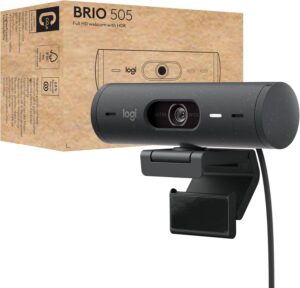
Backed by Wirecutter’s rigorous blind-panel testing and corroborated by four additional expert sources evaluating the closely related Brio 500, this 1080p webcam delivers the most consistently accurate image quality, skin tones, and autofocus of any general-purpose model we found.
Best Budget Webcam
Anker PowerConf C200 2K
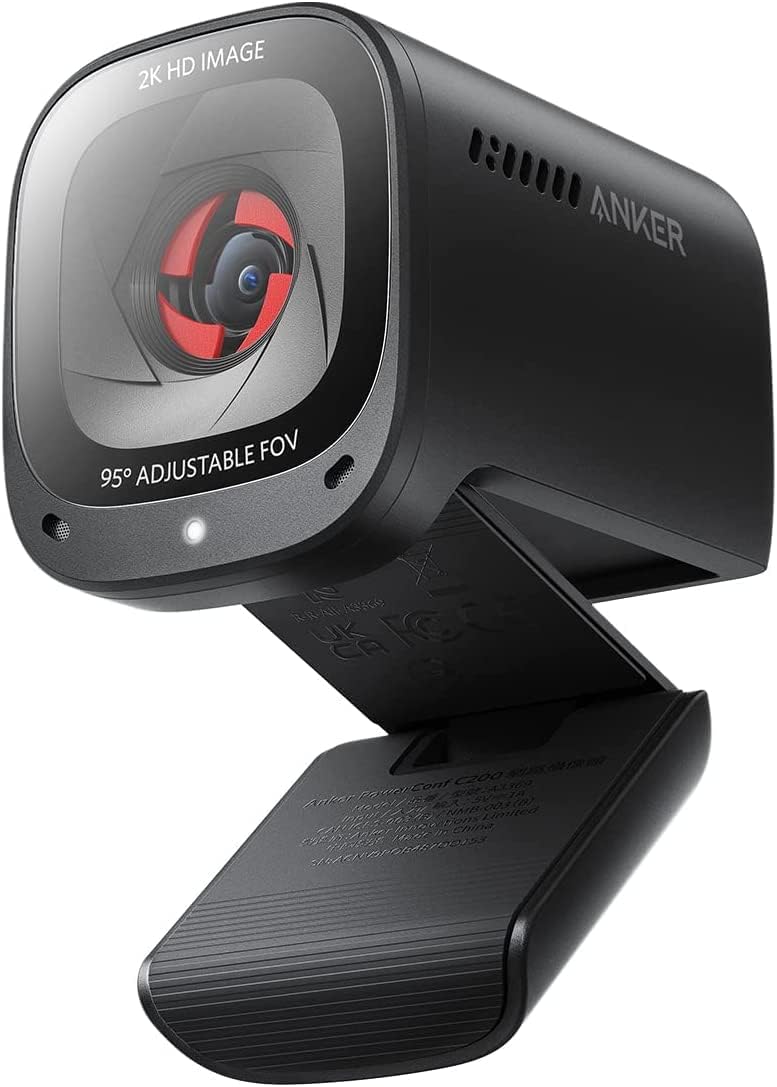
Selected as the top budget pick by both Wirecutter and Tom’s Guide, the C200 2K delivers the best image quality of any webcam at its price — and its 2K resolution gives it a genuine sharpness edge over 1080p budget competitors.
Top Picks in Detail
Below are our recommendations explained in more depth, including why experts agree and where each pick has trade-offs.
Best Overall: Logitech Brio 505
BEST OVERALL
Logitech Brio 505
Five expert sources endorse the Logitech Brio 500/505 family as their top or near-top general-purpose webcam. Wirecutter’s blind-panel evaluation ranked the Brio 505 first for skin-tone accuracy and overall picture quality among all general-purpose webcams tested. Its autofocus, auto white balance, and subject tracking work right out of the box with no software required.
If you buy through our links, we may earn a commission. This doesn’t affect our recommendations.
Moderate Consensus Note: The Best Overall webcam space shows significant fragmentation across expert sources — eight different Primary sources each named a different product as their top pick. The Logitech Brio 505 family has the broadest cross-source endorsement pattern, but no single product achieves a dominant majority. Readers should consider the runners-up below, which each represent a different expert evaluation priority (resolution, features, or value).
Why It’s a Top Pick
The webcam category is unusually fragmented — different expert sources bring different evaluation lenses to bear, and those lenses produce different winners. Sources that prioritize plug-and-play simplicity and image naturalness tend to pick the Brio 505 or its closely related sibling, the Brio 500. Sources that prioritize raw resolution or AI-powered features tend to pick 4K models like the Insta360 Link 2C or Obsbot Tiny 3. The Brio 505 earns the Best Overall designation here because it has the broadest endorsement pattern across sources with the most rigorous testing methodologies.
Wirecutter selected the Brio 505 as its Top Pick after testing 26 webcams, using a blind panel evaluation in which staffers ranked image and video quality without knowing which camera produced which footage. In that evaluation, the Brio 505 beat all competitors — including several with 4K resolution — for best skin tones and best overall picture quality. Tom’s Hardware names the closely related Brio 500 as its Best Webcam for Most People, praising its exposure-balanced image right out of the box. Engadget selects the Brio 500 as its Best Webcam Overall, noting the improved light correction over its predecessor.
The Brio 505 is the preferred variant over the Brio 500 because it adds a detachable USB-C cable and a three-year warranty (versus one year for the Brio 500), for a modest premium. Both models share the same sensor, lens, autofocus system, and image processing.
What Experts Like
- Sharp, natural-looking 1080p video with accurate automatic white balance, even in mixed lighting
- Speedy autofocus and subject-tracking features usually reserved for webcams twice the price
- Integrated privacy dial that closes with a satisfying magnetic click — no stick-on covers required
- Works right out of the box on Windows, macOS, and ChromeOS with no mandatory software
- Robust Logi Tune software for manual control of exposure, gain, white balance, and field of view
Trade-Offs to Consider
- Limited to 1080p at 30 fps — no 4K or 60 fps option for streaming or local recording
- The magnetic monitor mount can come loose and requires periodic retightening
- Subject tracking is not as smooth as gimbal-based systems like the Insta360 Link 2 Pro
Runners-Up
The webcam category’s fragmentation means strong alternatives exist for users whose priorities differ from the broad-appeal profile the Brio 505 serves best.
- Insta360 Link 2C — Tom’s Guide’s Best Overall and TechRadar’s Best 4K pick. This 4K webcam offers AI tracking, Phase Detection Autofocus (PDAF), and a clean depth-of-field effect from its 1/2-inch sensor. It didn’t win because fewer sources place it as their top general-purpose recommendation, and the higher price makes it less universally accessible. Note: A successor, the Insta360 Link 2C Pro, launched in January 2026 with a larger 1/1.3-inch sensor and improved audio. WIRED already recommends the Pro variant, and sources that still recommend the original Link 2C may not have updated to reflect this launch.
- Obsbot Tiny 3 — PCMag’s Best Overall and Tom’s Guide’s Best Premium pick. PCMag calls it the best webcam they’ve tested overall, citing 4K video, mechanical PTZ capabilities, effective AI movement tracking, and voice control. CNET recommends the more affordable Tiny 3 Lite as its Best Overall pick. The Tiny 3 didn’t win because its premium price point positions it more as a content-creation tool than a general-purpose webcam.
- eMeet Piko+ — PCWorld’s Best Overall pick. PCWorld was amazed by its ability to capture crisp 4K visuals in low light at a fraction of the cost of competing 4K webcams, thanks to its unique dual-lens design with a dedicated AI-assist camera. It didn’t win due to single Primary source endorsement, though PCWorld’s value-focused testing methodology lends weight to the selection.
Best Budget Webcam: Anker PowerConf C200 2K
BEST BUDGET WEBCAM
Anker PowerConf C200 2K
Four expert sources select the Anker PowerConf C200 2K as their budget or value recommendation — making it the strongest consensus pick in either segment. Its 2K resolution provides a genuine sharpness advantage over 1080p competitors at the same price, and its plug-and-play simplicity matches that of webcams at twice its cost.
If you buy through our links, we may earn a commission. This doesn’t affect our recommendations.
Why It’s a Top Pick
The Anker PowerConf C200 2K is the only budget webcam that earned pick-level endorsements from both Wirecutter and Tom’s Guide — the two sources with the most extensive comparative testing programs in this category. Wirecutter calls it the best video quality of any webcam tested at this price point, and Tom’s Guide says it gives you an impressive feature set at a super accessible price. Engadget selects it as its Best Budget pick, praising the easy plug-and-play setup, while Laptop Mag names it its Best Midrange webcam for its high-quality imagery at a fair price.
The C200 2K’s defining advantage is its 2K (1440p) resolution at a budget price point. Most competitors in this range are limited to 1080p. The higher resolution produces a noticeably sharper image and provides more latitude for digital cropping and zooming without losing clarity. The webcam also includes AI noise-canceling microphones, adjustable field of view (65°, 78°, or 95° via software), a built-in privacy cover, and autofocus — a comprehensive feature set for its price.
What Experts Like
- 2K resolution at a budget price provides a sharpness advantage over 1080p competitors
- Easy plug-and-play setup with no mandatory software installation
- Adjustable field of view with three angle options via the AnkerWork app
- Built-in privacy cover with a bright red indicator that makes lens status easy to see at a glance
Trade-Offs to Consider
- Image quality, autofocus, and auto white balance don’t match the Logitech Brio 505 — images are darker in testing
- Camera tilts up and down but cannot swivel side to side
- 30 fps only — no 60 fps option for smoother video
Runners-Up
- Logitech C920S — CNN Underscored’s Best Webcam and Laptop Mag’s Best Overall. The long-standing gold standard for budget webcams, delivering reliable 1080p video with dual microphones and a privacy shutter. It didn’t win because Wirecutter notes its footage now looks grainy compared to newer competitors, and its 1080p resolution falls behind the C200 2K’s 2K output.
- Elgato Facecam Neo — Tom’s Hardware’s Best Budget pick. Offers 1080p at 60 fps with autofocus, a specification combination rare at this price. It didn’t win due to single Primary source endorsement.
- Obsbot Meet SE — TechRadar’s Best Overall webcam (not limited to budget) and CNET’s top affordable pick. TechRadar says it significantly outperforms the similarly priced Logitech C920 in image quality, features, and overall performance. Its compact design with AI-powered autofocus and auto-framing brings features usually found in much more expensive models. It didn’t win the budget segment because fewer sources specifically classify it as a budget pick, though TechRadar’s Best Overall designation is notable.
How to Choose the Right Webcam for You
Resolution matters less than you might think for video calls. Most video conferencing platforms — including Zoom, Microsoft Teams, and Google Meet — cap outgoing video at 1080p or lower, regardless of your webcam’s resolution. A 4K webcam can still look better because its larger sensor captures more light and produces a cleaner downscaled image, but the jump from 1080p to 4K is less dramatic in a Zoom call than it is in a local recording or stream.
Good lighting improves any webcam more than upgrading the camera itself. Nearly every expert source we consulted emphasized this point. A well-lit room with natural light will make a budget webcam look dramatically better, while even a premium 4K model will struggle in a dark room. If your environment is consistently dim, prioritize a webcam with a larger sensor and strong low-light correction over raw resolution.
Consider whether you need PTZ tracking or AI framing. Pan-tilt-zoom webcams with AI tracking — like the Insta360 Link 2C or the Obsbot Tiny 3 — physically follow you as you move, keeping you centered in the frame. This is valuable for presenters, educators, and streamers who move around during calls. For most users who sit at a desk, static webcams with software-based auto-framing provide a simpler, less expensive solution.
Built-in microphones are generally poor across all price points. Multiple expert sources noted that even premium webcams deliver mediocre microphone quality. If audio clarity matters — for professional calls, streaming, or recording — invest in a dedicated USB microphone or use a headset with an integrated mic rather than relying on your webcam’s built-in audio.
A privacy shutter is a small feature that matters. Several experts highlighted privacy shutters as a worthwhile feature. Physical shutters provide visible confirmation that your camera is off, which is especially important in home offices where the boundary between personal and professional space is fluid.
How We Make Our Recommendations
Our recommendations follow a documented, repeatable editorial process designed to prioritize expert agreement, comparability, and clarity.
For each category, we:
- Define clear category scope and exclusions
- Identify and vet independent expert review sources
- Inventory all products reviewed across those sources
- Analyze patterns of agreement and disagreement
- Apply editorial judgment only after consensus is documented
When a category includes materially different product types, we segment recommendations rather than forcing a single “best overall.” For more information, see How We Work.
Sources & Citations
Primary Sources
- CNET, Best Webcams From 1080p to 4K for 2026, May 2025
- CNN Underscored, The best webcams for Mac and PC of 2026, tried and tested, Jan. 2026
- PCMag, The Best Webcams for 2026, April 2026
- PCWorld, Best webcams: Top picks and expert buying advice, May 2026
- TechRadar, The best webcams in 2026: our top tested 1080p and 4K picks, April 2026
- Tom’s Guide, These are the 10 best webcams in 2026 we’ve tested that I actually recommend, May 2026
- Tom’s Hardware, Best Webcams 2026: Our Tested Picks for 1080p, 2K, and 4K, March 2026
- Wirecutter, The Best Webcams, March 2026
- WIRED, The Best Webcams for Looking Bushy-Tailed on Zoom, May 2026
Secondary Sources Consulted for Context
- Engadget, The best webcams for 2026, Feb. 2026
- Laptop Mag, The best webcams in 2025: The top picks, based on our real-world testing, Nov. 2025
- PC Gamer, Best webcams in 2026: the 1080p and 4K webcams I recommend for gamers and streamers, Jan. 2026
Additional Sources Reviewed
- Best Products, The 6 Best Webcams for Consistently Clear Conference Calls, Jan. 2026
- Consumer Reports, Best Webcams for Videoconferencing, July 2021
- Forbes Vetted, The Best Webcams Help You Look Sharp On Every Call, March 2026
- IGN, The Best Webcams Right Now: Top Picks to Level Up Your Streaming Setup, Dec. 2025
- Lifewire, The 9 Best Webcams of 2026, March 2026
Updates & Ongoing Review
This review is monitored on an ongoing basis. We update recommendations when expert sources publish new test results, products are discontinued, or consensus meaningfully changes.
Version History
- 2026-06-08 — Initial publication