
Best Computer Speakers (Expert Consensus)
Last reviewed: 2026-06-18
(This page is updated periodically as expert recommendations and market conditions change.)
Disclosure: This page contains affiliate links. If you buy through our links, we may earn a commission. This does not influence our recommendations or rankings.
Sources
19
expert sources consulted
Products
67
products considered
Consensus Picks
10
top picks 🥇 & runners-up 🥈
Category Overview & Market Context
What This Category Is
Computer speakers are powered audio systems designed to sit on or near a desktop and deliver sound from a PC, laptop, or Mac. They range from compact USB-powered 2.0 stereo pairs to 2.1 systems with dedicated subwoofers and full 5.1 surround configurations. Unlike passive bookshelf speakers, which require a separate amplifier, computer speakers include built-in amplification and connect directly to a computer — typically via USB-C, 3.5 mm auxiliary (headphone jack), or Bluetooth.
State of the Market
The desktop speaker market has matured considerably, with strong options now available at nearly every price point. USB-C connectivity is increasingly standard, often providing better audio quality than 3.5 mm connections by bypassing the computer’s built-in digital-to-analog converter (DAC). Bluetooth support has become widespread even in budget models, and gaming-focused speakers now commonly include spatial audio processing, customizable equalizer (EQ) profiles, and RGB lighting. Compact speakers have improved substantially at the entry level, while mid-range 2.1 systems offer deeper bass and wireless control features. At the premium end, audiophile-grade powered monitors are increasingly positioned for desktop use.
Who This Is For / Not For
This review is for anyone who uses a computer as a primary audio source and wants better sound than built-in laptop or monitor speakers can deliver. That includes remote workers, gamers, music listeners, content creators, and anyone who watches videos or streams media at their desk. It is not intended for professional studio monitoring at the production level, full home theater surround systems, or portable Bluetooth speakers designed for on-the-go use.
How This Review Was Produced
This review is based on expert consensus rather than a single reviewer’s opinion.
We analyze and synthesize recommendations from multiple independent expert review sources that meet our editorial quality and transparency standards. We document where experts agree, where they differ, and why. No single source determines our recommendations.
We do not conduct original product testing. Instead, we rely on experts who do — such as publications that perform hands-on testing, lab measurements, or clearly documented evaluation methodologies.
Manufacturers do not influence our recommendations. Advertising, affiliate relationships, or commercial considerations do not affect which products are included, how they are ranked, or how they are described.
When helpful, we also consult additional secondary review outlets to understand how broader expert opinion aligns — or conflicts — with the primary consensus. These secondary sources do not determine winners but may provide context or confirmation.
Top Picks at a Glance
Best Overall
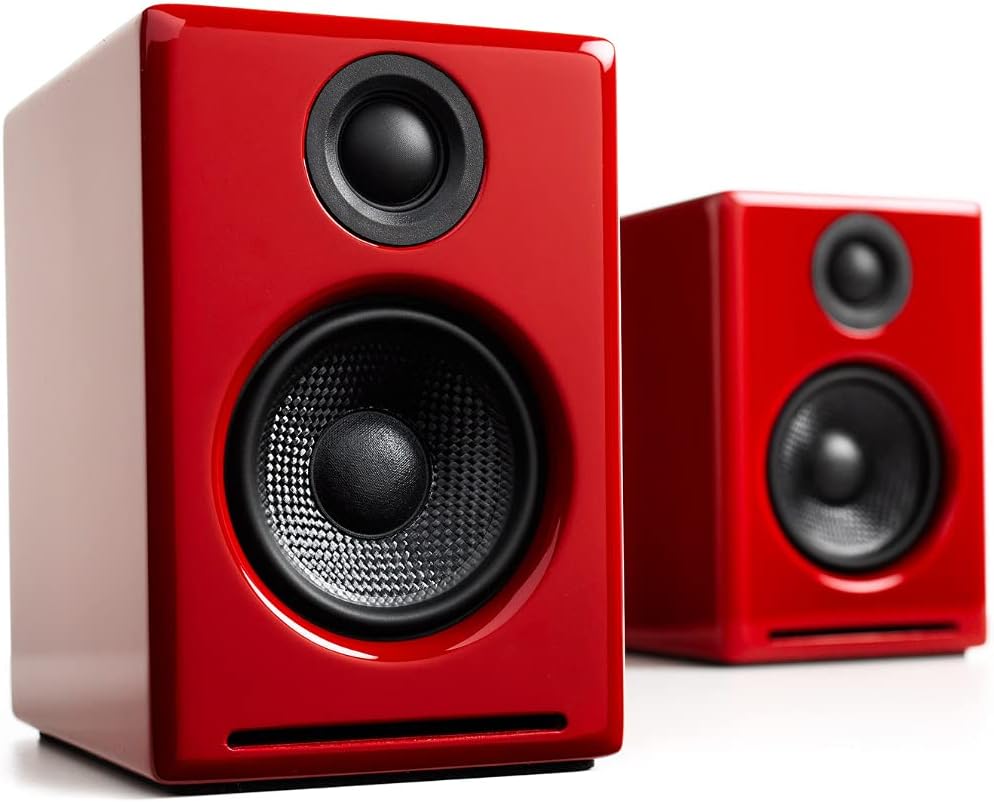
Audioengine A2+
Backed by four Primary sources, the Audioengine A2+ delivers rich, detailed sound in a compact wood-cabinet design that fits comfortably on any desk.
Best Budget Computer Speakers
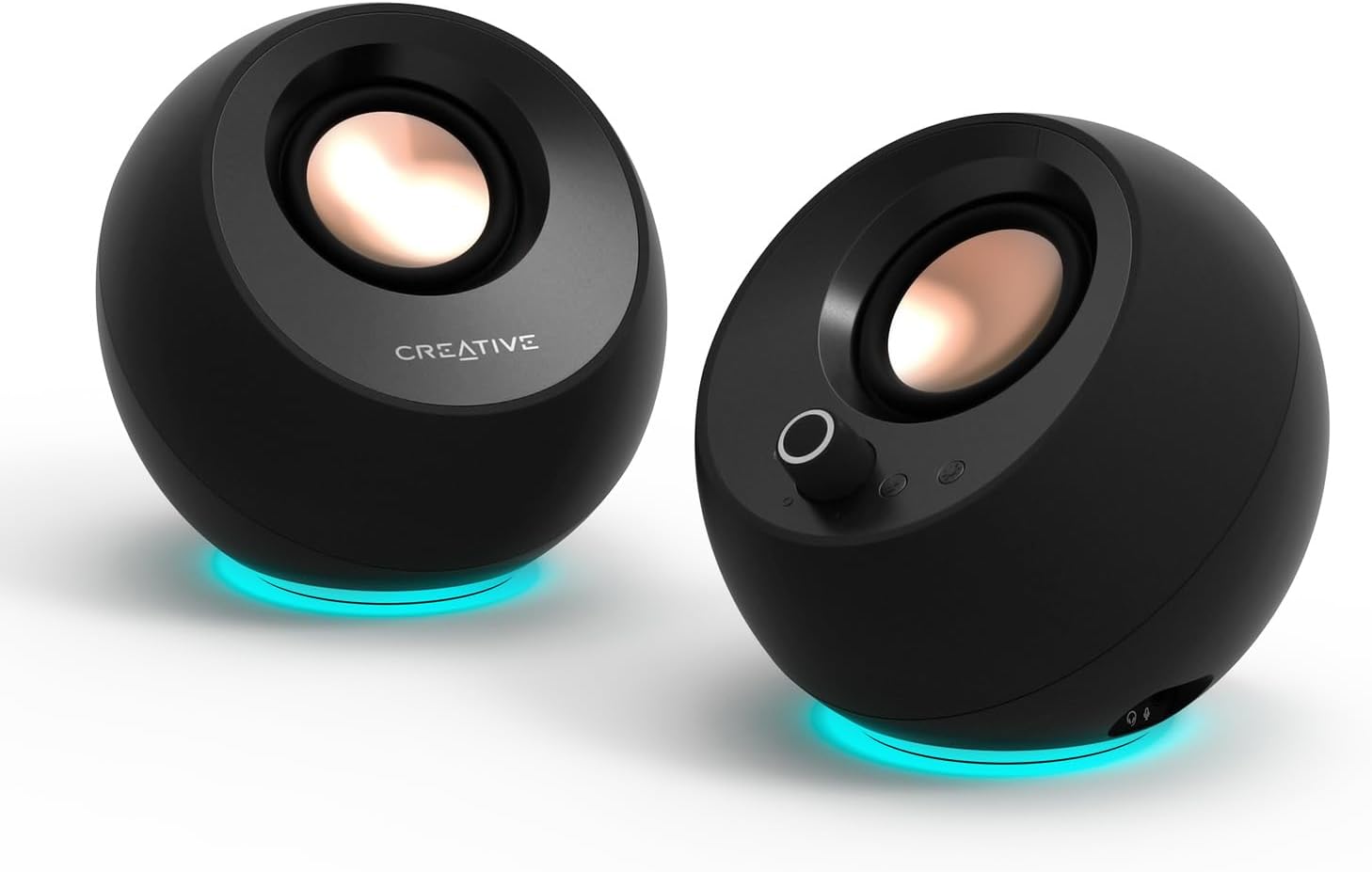
Creative Pebble Pro
Six Primary sources endorse this compact, USB-C-powered speaker as the best affordable option, with sound quality that consistently exceeds expectations for its size and price.
Best for Gaming Computer Speakers
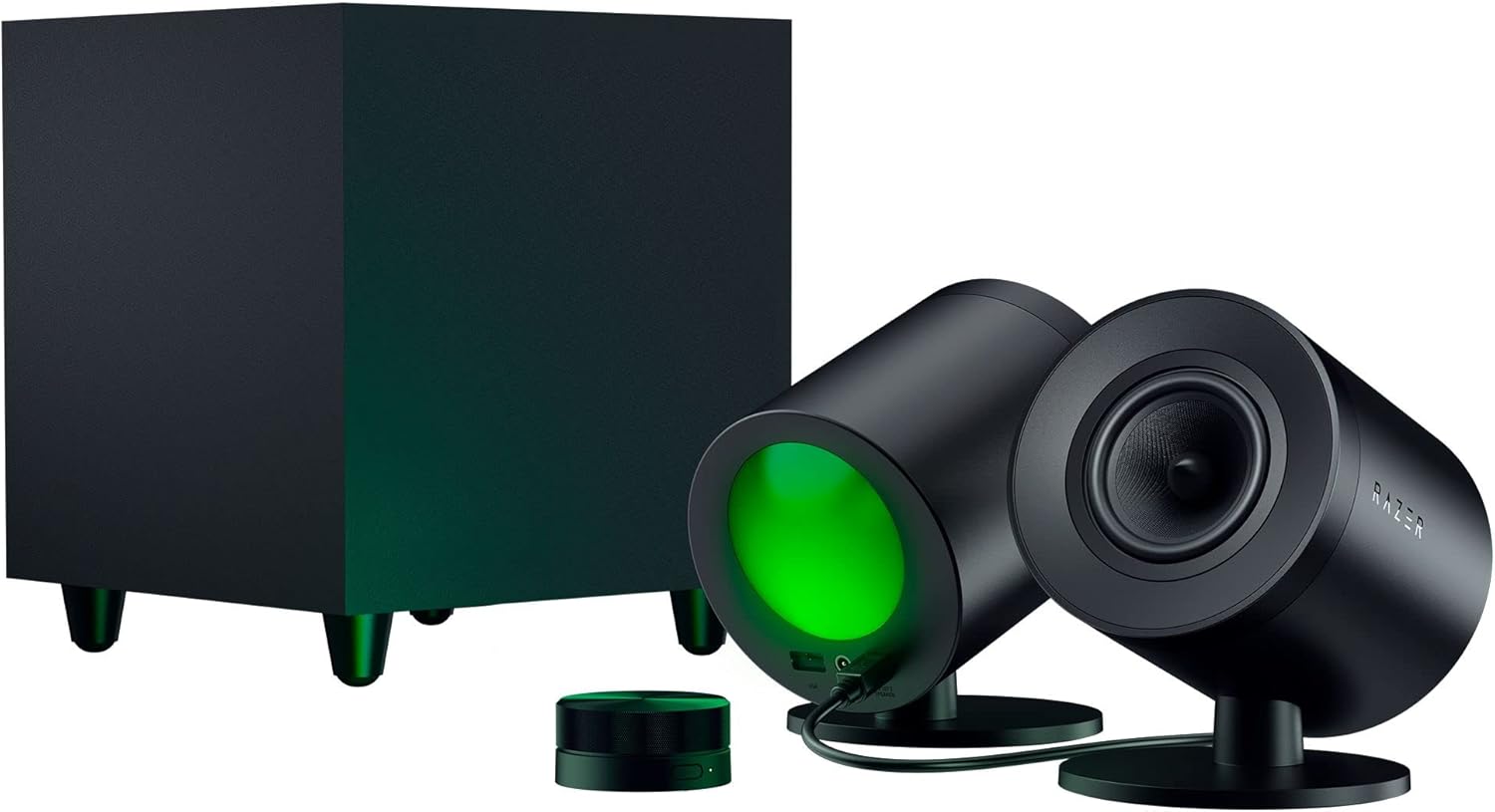
Razer Nommo V2 Pro
Three Primary sources select this 2.1 system with wireless subwoofer and THX Spatial Audio as the top gaming speaker for immersive directional sound.
Top Picks in Detail
Below are our recommendations explained in more depth, including why experts agree and where each pick has trade-offs.
Best Overall: Audioengine A2+
BEST OVERALL
Audioengine A2+
Earns its place as the best overall computer speaker through broad expert agreement on its balanced, detailed sound and versatile connectivity. Four Primary sources — including WIRED, Tom’s Hardware, Reviewed, and CNET — select it as their top or premium pick. With USB-C, Bluetooth, and analog inputs housed in hand-finished real-wood cabinets, the A2+ pairs clean highs and warm mids with a compact footprint that suits nearly any desk.
If you buy through our links, we may earn a commission. This doesn’t affect our recommendations.
Why It’s a Top Pick
The Audioengine A2+ stands out for a combination of sound quality, build quality, and connectivity that no other tested speaker matches at its size. WIRED names it Best Overall after testing more than 25 pairs, noting strong stereo separation and clear sound across genres. Reviewed finds it produces the highest-quality sound of any compact speaker tested, with finely balanced and impactful audio across low mids through the higher registers. Tom’s Hardware selects it as Best Premium 2.0, praising its solid, well-built construction and excellent audio quality. CNET includes it as the best-sounding pick under its price tier, highlighting the custom aramid fiber woofers and silk dome tweeters.
The speaker’s real-wood cabinets — available in multiple finishes including a limited-edition color-of-the-year option — set it apart visually from plastic competitors. The built-in DAC processes audio directly via USB-C, bypassing the computer’s lower-quality audio components for cleaner, more detailed playback. Bluetooth 5.3 with aptX-HD support handles wireless streaming, and RCA and 3.5 mm inputs accommodate turntables and legacy devices. A subwoofer output allows bass-focused listeners to expand the system to 2.1.
What Experts Like
- Rich, detailed sound with strong stereo separation and a wide soundstage that belies the speakers’ compact size
- Built-in DAC via USB-C delivers cleaner audio than the computer’s onboard sound processing
- Hand-finished real-wood cabinets provide both acoustic benefit and a premium look across multiple color options
- Versatile connectivity including USB-C, Bluetooth 5.3 with aptX-HD, RCA, and 3.5 mm auxiliary input
Trade-Offs to Consider
- Bass is warm and present but lacks the deep low-end rumble that a subwoofer provides — bass-heavy listeners may want to add the optional Audioengine subwoofer
- Priced at the premium end of the desktop speaker market, which may be more than casual listeners need
- No remote control included — volume adjustment requires reaching the rear-mounted dial on the speaker
Runners-Up
This segment has strong alternatives that serve different priorities within the general-use desktop category.
- Edifier M60 — Tom’s Guide names it Best Overall for balancing price, performance, and an ultra-compact form factor at just four inches wide. WIRED selects it as Best For $200. The M60 packs a 66-watt RMS output with a 3-inch aluminum mid-bass driver and silk dome tweeter, supporting USB-C, Bluetooth 5.3 with LDAC, and 3.5 mm auxiliary. It did not win because fewer Primary sources endorse it, and its smaller drivers limit the bass depth and dynamic range available from the Audioengine A2+.
- Pioneer DJ DM-50D-BT — Wirecutter’s Top Pick via panel-based blind listening tests, the Pioneer delivers outstanding flexibility with a DJ/Production mode switch, Bluetooth support, and multiple inputs including TRS, RCA, and 3.5 mm. The 5-inch woofer produces balanced, punchy bass. It did not win because only one Primary source selects it as a top pick, and its larger size and studio-monitor aesthetic may not suit all desk setups.
- Logitech Z407 — Four Primary sources — CNN Underscored, Reviewed, PC Gamer, and PCMag — select this versatile 2.1 system across mid-range and overall categories. The wireless control dial, Bluetooth connectivity, and included subwoofer provide substantial functionality at an accessible price point. It did not win because its sound quality, while good for the price, does not match the audiophile-grade clarity of the Audioengine A2+ or the Pioneer DJ DM-50D-BT.
Best Budget Computer Speakers: Creative Pebble Pro
BEST BUDGET COMPUTER SPEAKERS
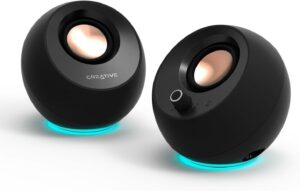
Creative Pebble Pro
With six Primary sources endorsing it as the best affordable option, the Creative Pebble Pro achieves the strongest single-product consensus in this review. The compact, orb-shaped speakers connect via USB-C for both power and audio, support Bluetooth 5.3, and include re-engineered drivers with BassFlex technology that delivers more bass than its size suggests. At a fraction of the cost of most competitors, the Pebble Pro proves that meaningful audio upgrades do not require a large investment.
If you buy through our links, we may earn a commission. This doesn’t affect our recommendations.
Why It’s a Top Pick
No other product in this review achieves the breadth of expert agreement that the Creative Pebble Pro commands. Six Primary sources — Tom’s Hardware, Tom’s Guide, Wirecutter, PC Gamer, PCMag, and TechRadar — each select it as their budget or affordable recommendation. Tom’s Guide calls it the best budget computer speakers primarily because of its combination of low cost and surprisingly capable sound. Wirecutter names it Budget Pick, describing the tiny, spherical speakers as a huge upgrade from built-in laptop speakers. PCMag selects it as Best Affordable Speakers, and TechRadar goes further, naming it Best Overall in a budget-focused evaluation. The Pebble Pro uses re-engineered drivers paired with integrated digital amplifiers and Creative’s BassFlex technology, which together produce richer audio and substantially more bass than the previous Pebble V3.
What Experts Like
- Compact, space-saving orb design that fits on even the smallest desks while angling sound upward toward the listener
- USB-C audio and power connection simplifies setup to a single cable from the computer
- Bluetooth 5.3 enables wireless streaming from phones and tablets
- Sound quality consistently exceeds expectations at this price point, with clear mids and more bass than the speaker size suggests
Trade-Offs to Consider
- Bass is improved over predecessors but still limited by the small driver size — not suitable for bass-heavy gaming or music
- No subwoofer output or expansion option for listeners who want deeper low-end response
- Maximum volume is modest compared to larger, AC-powered speakers
Runners-Up
- Creative Pebble V3 — Three Primary sources — WIRED, CNET, and Laptop Mag — select the Pebble V3 as their budget pick. It uses the same 2.25-inch drivers as the Pebble Pro and supports USB-C audio, power, and Bluetooth 5.0. It costs less than the Pebble Pro but lacks the Pro’s RGB lighting, microphone port, and BassFlex technology. For buyers who want the core Pebble experience at the lowest price, the V3 is the natural choice.
- Creative Pebble X Plus — Wirecutter names it Best Computer Speakers if You Want a Subwoofer, and PCWorld selects it as Best for Less Than $150. This 2.1 system adds a compact cube-shaped subwoofer to the Pebble formula, delivering deeper bass while maintaining the lineup’s plug-and-play simplicity. It is larger and more expensive than the Pebble Pro, but offers a meaningful bass upgrade for listeners who want budget plus bass.
Best for Gaming Computer Speakers: Razer Nommo V2 Pro
BEST FOR GAMING COMPUTER SPEAKERS
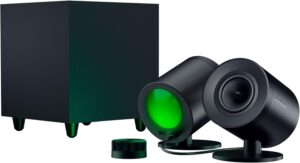
Razer Nommo V2 Pro
Three Primary sources select the Razer Nommo V2 Pro as the top gaming speaker for its powerful 2.1 configuration, wireless subwoofer, THX Spatial Audio support, and Razer Chroma RGB integration. The system delivers impressive directional accuracy and room-filling bass designed for immersive single-player and competitive gaming.
If you buy through our links, we may earn a commission. This doesn’t affect our recommendations.
Moderate Consensus Note: Three of twelve Primary sources select the Razer Nommo V2 Pro as their gaming pick. The gaming computer speaker segment is fragmented across 2.0, 2.1, and 5.1 system types, with sources using different criteria for what constitutes the “best gaming” speaker. This Moderate Consensus reflects genuine expert diversity in how gaming audio needs are evaluated, not a lack of quality options.
Why It’s a Top Pick
The Razer Nommo V2 Pro earns its position through three Primary source endorsements and a feature set built specifically for gaming. Tom’s Hardware selects it as Best 2.1 Gaming, highlighting its impressive directional audio and virtual surround sound. TechRadar names it Best Premium with Subwoofer, calling it even better than its predecessor. Laptop Mag selects it as Best for Gaming in its roundup. The system pairs two desktop speakers with 3.2-inch full-range drivers and aluminum phase plugs alongside a wireless down-firing subwoofer. THX Spatial Audio on Windows enables virtual 7.1 surround sound for positional gaming accuracy, and Razer Chroma RGB creates rear-projection lighting effects that sync with on-screen action across more than 300 supported games.
What Experts Like
- Powerful, room-filling 2.1 sound with a wireless subwoofer that delivers deep, controlled bass
- THX Spatial Audio provides virtual 7.1 surround sound with strong directional accuracy for competitive and immersive gaming
- Razer Chroma RGB rear-projection lighting syncs with games, music, and screen colors
- Wireless control pod allows convenient volume, EQ, and source adjustments from the desktop
Trade-Offs to Consider
- Priced at the premium end of the gaming speaker market
- Connectivity limited to USB-C and Bluetooth — no optical or 3.5 mm auxiliary input
- Razer Synapse software is required for full customization and can feel resource-heavy
- Sound profile leans bass-heavy, which suits action games and movies but may lack crispness in the highs for music listening
Runners-Up
The gaming segment includes strong alternatives that serve different gaming audio priorities and budgets.
- Edifier G2000 Pro — Three Primary sources — Tom’s Hardware (Best 2.0 Gaming), Tom’s Guide (Best for Gaming), and TechRadar (Best for Budget Gamers) — select this affordable 2.0 speaker with RGB lighting and virtual surround sound. It is the best choice for gamers who do not want or need a subwoofer, offering three sound modes (Music, Game, Movie) and broad connectivity via Bluetooth, USB, and 3.5 mm auxiliary. It did not win because its 2.0 configuration lacks the bass depth and spatial immersion of the Nommo V2 Pro’s 2.1 system.
- SteelSeries Arena 9 — Four Primary sources — WIRED, Tom’s Hardware, Tom’s Guide, and TechRadar — select this as the best surround sound system. The full 5.1 setup includes two front speakers, two wireless rear speakers, a center channel, and a subwoofer. For buyers willing to dedicate the desk space and budget to true surround sound, the Arena 9 delivers the most immersive gaming audio experience tested. It did not win because its 5.1 configuration is a niche use case requiring significant space and investment.
- Logitech G560 Lightsync — Reviewed selects it as Best for Gaming. The 2.1 system features DTS:X Ultra virtual surround sound and LIGHTSYNC RGB lighting that reacts dynamically to on-screen action. Connectivity includes USB, Bluetooth, and 3.5 mm auxiliary. It did not win because only one Primary source selects it as a gaming pick, and the product has been on the market longer than newer competitors.
How to Choose the Right Computer Speakers for You
Decide between a 2.0 stereo pair and a 2.1 system with a subwoofer. A 2.0 setup uses two speakers and keeps your desk clean, while a 2.1 system adds a separate subwoofer — typically placed on the floor — for deeper bass response. If you listen to bass-heavy music, play action games, or watch movies with cinematic soundtracks, a 2.1 system will provide a noticeably fuller experience. If desk space is limited or you primarily use speakers for work calls, podcasts, and casual listening, a 2.0 pair is more practical.
Consider how you will connect the speakers to your computer. Most modern computer speakers offer USB-C, 3.5 mm auxiliary, and Bluetooth connections. USB-C audio often sounds better because the speakers’ built-in DAC handles the digital-to-analog conversion rather than the computer’s lower-quality onboard chip. Bluetooth is convenient for wireless streaming from phones and tablets, but wired connections provide more reliable, latency-free audio. If you plan to connect a turntable, TV, or game console, check for RCA or optical inputs.
Match speaker size to your available desk space. Compact speakers like the Creative Pebble Pro are roughly the height of a soda can and fit on even the smallest desks. Mid-size speakers like the Audioengine A2+ require slightly more room but reward the space with better sound. Larger speakers and 2.1 systems with subwoofers need both desk space for the satellites and floor space for the subwoofer. Measure your available area before purchasing, and consider whether speakers with angled stands or adjustable tilt will direct sound toward your seated position.
Evaluate whether you need gaming-specific features. Gaming speakers often include virtual surround sound processing (such as THX Spatial Audio or DTS:X Ultra), customizable EQ profiles tuned for gaming audio, and RGB lighting that syncs with on-screen action via software like Razer Synapse or Logitech G Hub. These features enhance immersion for gaming but add cost and complexity. For general desktop use, music, and media consumption, a well-tuned 2.0 or 2.1 system without gaming-specific features will often deliver better sound per dollar.
Understand what you are paying for at different price tiers. Entry-level speakers — like the Creative Pebble Pro — deliver a meaningful upgrade over built-in computer audio and are suitable for casual listening and everyday use. The mid-range tier typically adds better build quality, larger drivers, more connectivity options, and clearer sound separation. Premium speakers invest in real-wood cabinets, higher-quality components, and flat frequency response that satisfies more discerning listeners. For most users, the mid-range tier offers the best balance of sound quality and value.
Think about USB-powered versus AC-powered speakers. USB-powered speakers draw power directly from the computer and require no separate power adapter — making them more portable and simpler to set up. However, USB power limits the maximum output, so these speakers typically get less loud and produce less bass than AC-powered alternatives. AC-powered speakers with a dedicated power supply can drive larger amplifiers and larger drivers, resulting in fuller, louder sound. If you need speakers primarily for a stationary desk setup, AC-powered models are generally the better investment.
How We Make Our Recommendations
Our recommendations follow a documented, repeatable editorial process designed to prioritize expert agreement, comparability, and clarity.
For each category, we:
- Define clear category scope and exclusions
- Identify and vet independent expert review sources
- Inventory all products reviewed across those sources
- Analyze patterns of agreement and disagreement
- Apply editorial judgment only after consensus is documented
When a category includes materially different product types, we segment recommendations rather than forcing a single “best overall.” For more information, see How We Work.
Sources & Citations
Primary Sources
- CNET, Best PC Speakers for 2026, July 2025
- CNN Underscored, The best computer speakers of 2026, tried and tested, Jan. 2026
- Laptop Mag, Best computer speakers in 2025: Budget and premium picks, April 2025
- PC Gamer, Best PC speakers in 2026: From 2.1 systems to bookshelf bangers, these are the best gaming PC speakers, Jan. 2026
- PCMag, The Best Computer Speakers for 2026, June 2026
- PCWorld, Best budget computer speakers: PC audio for less than $150, May 2026
- Reviewed, The Best Computer Speakers of 2026, May 2024
- TechRadar, The best computer speakers 2025: top tested and reviewed speakers for your PC, Aug. 2025
- Tom’s Guide, Best computer speakers: Top desktop models tested and rated, March 2026
- Tom’s Hardware, Best PC Speakers 2026: From Budget to Audiophile Bliss, June 2026
- Wirecutter, The Best Computer Speakers, May 2026
- WIRED, The Best Computer Speakers for Jamming Out in Your Home Office, May 2026
Secondary Sources Consulted for Context
- Forbes Vetted, The Best Computer Speakers Enhance Games, Podcasts, Movies And Music, Nov. 2025
- GamesRadar+, Best computer speakers 2026: The clearest sounding picks for your PC, March 2026
- PCGamesN, Best computer speakers for gaming 2026, May 2026
- SoundGuys, Best computer speakers for 2025, Aug. 2025
- What Hi-Fi?, Best computer speakers 2026: the top desktop options for hi-fi fans tested by our experts, May 2026
Additional Sources Reviewed
- Esquire, The 7 Best Computer Speakers to Upgrade Your Desk, Jan. 2026
- IGN, The Best PC Speakers, Jan. 2026
Updates & Ongoing Review
This review is monitored on an ongoing basis. We update recommendations when expert sources publish new test results, products are discontinued, or consensus meaningfully changes.
Version History
- 2026-06-18 — Initial publication